


Paint AI: Color Visualizer
4.144.00 Reviews
App Specs
- Version
- 1.4.3+20260226T062544.7f2a4b51.0a4faf04
- Updated On
- License
- Free
- Downloads
- 100,000+
- Developer
- ReImage AI Inc.
- Categories
- Art & Design
- Platform
- Android
Screenshots

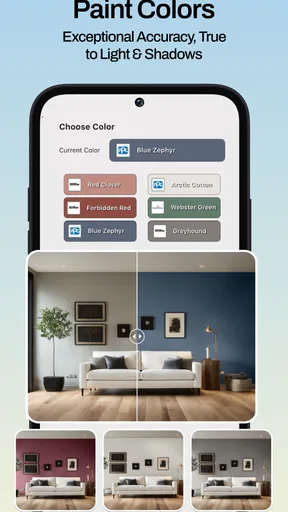
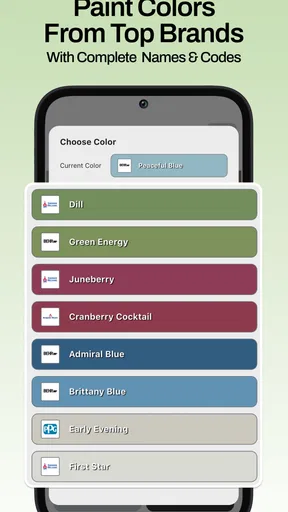
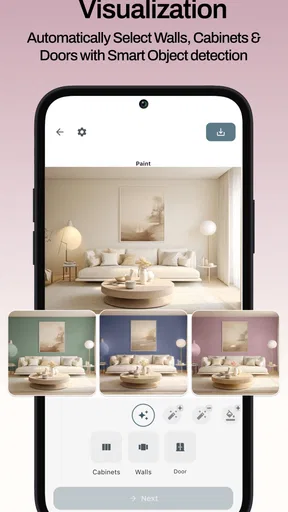
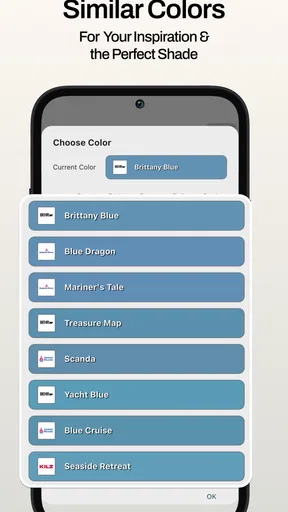
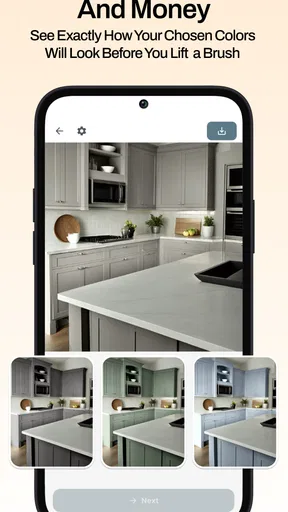
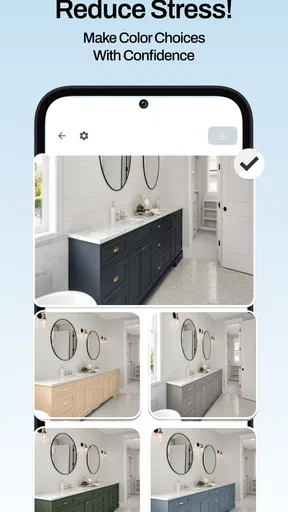
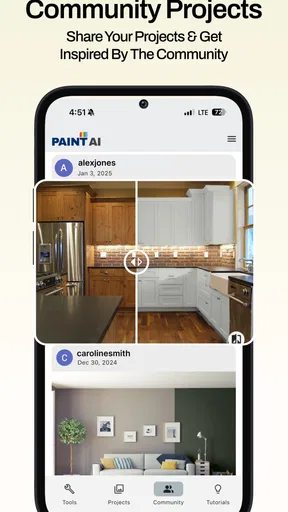
 Analysis by AppCompare
I like the idea of trying wall colors on a phone before buying paint, but I’d treat Paint AI as a planning aid rather than a promise of exactly how a finished room will look. A photo or live camera view can make it easier to narrow down choices, especially when several shades seem nearly identical on a paint card. The useful question is not just whether a color looks appealing on screen, but whether it still feels right beside your flooring, furniture, and the light you actually live with.
Where a connection can affect the process
Paint visualizing has a few distinct stages: getting an image into the app, trying color ideas, and keeping or sharing the options you want to revisit. In a connected setting, that workflow is naturally easier to fit into a larger decision-making process, such as discussing a shortlist with someone who is not standing in the room. I would avoid making a final paint purchase from a quick screen preview alone; the display and the room’s lighting can change how a shade appears.
That distinction matters if you are using the app while visiting a hardware shop or standing in a room with an unreliable signal. I would prepare the room photo and shortlist ideas when it is convenient, then check any live or online-dependent parts when the connection is dependable. For a fast decision, a photo-based comparison can be less awkward than repeatedly moving around with a phone camera, while live viewing is more useful for judging how a color sits across the actual space.
A phone is helpful, but the room still sets the limits
On a small screen, a broad wall can look like a clean block of color even when the real surface has shadows, texture, or objects in front of it. I find it more practical to use the visualizer to compare direction—warmer versus cooler, muted versus vivid—than to trust it for an exact paint match. Check a promising option at different times of day and alongside the fixed items you are not planning to replace.
For a shared home, there is another useful workflow: take a clear view of the room, make a small shortlist, and show those options to the people who will use the space. That keeps the conversation focused. Instead of asking whether someone likes an abstract paint swatch, you can ask which version works better with the sofa or cabinetry already in place. If the room is crowded, capture more than one angle rather than assuming a single image represents every wall.
Handling a result that looks wrong
AI coloring can be less convincing around edges, reflective surfaces, or objects that blend into the wall. If a preview spills over a doorframe or treats a shadow oddly, I would not keep adjusting the shade as if that were a color problem. First try a clearer angle with stronger, even light and fewer objects blocking the wall. A cleaner image can make a comparison more useful, though it still cannot reproduce the finish and lighting of real paint.
If a view stalls or a result is not ready when you need it, the sensible fallback is to save the room photo and return to the comparison when your connection and time allow. I would also keep a written note of the names or descriptions of the options I am considering instead of relying on memory. That small habit makes it easier to resume a decision later, especially when several near-neighbor colors look alike.
Worth Reading Before You Choose

EA SPORTS FC Mobile 26 Is a Bigger Football Game, but It Takes Time

Flipboard Shows What News Apps Must Do Beyond the Feed

Switching to Android Auto Means Rethinking Your Driving Routine

Google Calendar Makes a Crowded Week Easier to Manage

Ludo King Makes the Most of the Minutes Between Plans

Baby Panda World Brings Quick Play to Modern Phones, but Its Game Library Feels Busy
Using it thoughtfully with photos and mobile data
Because this is a camera-centered decorating tool, I would choose room images deliberately. A tidy, well-lit view is not only easier to judge; it also avoids including personal details that do not help with a paint decision. When using mobile data, I would reserve repeated experiments or sharing for a connection I am comfortable using, rather than assuming every step behaves the same way offline. The practical approach is to test the workflow once before relying on it during a shopping trip.
Paint AI: Color Visualizer is an art and design app from ReImage AI Inc. It is free to download, rated for Everyone, and has a 4.1 average from around 1.1K ratings, with over 100K installs. The app was released on September 22, 2024, and its current version is 1.4.3+20260226T062544.7f2a4b51.0a4faf04, with Android 7.0 as the minimum operating system. Optional in-app purchases range from $4.99 to $39.99 per item, so I would check what is included before paying. Those details make it approachable to try, but the purchase choices are worth considering if you only need a one-off color comparison.
Compared with browsing paint-company palettes or holding paper swatches against a wall, a visualizer is faster for exploring combinations in context. Those traditional methods still have an advantage when you want to judge a real material under your own lighting. I would use the app to reduce a long list to a few candidates, then verify the finalists with physical samples or a store’s own color tools. It is less suited to someone who needs a precise, contractor-ready specification or a guaranteed match from a phone screen.
Who will get the most from it
This is a good fit if you are deciding whether a room should feel lighter, warmer, or more dramatic, and you want to see several possibilities before committing. It can also help renters or homeowners plan a refresh by making the conversation with family more concrete, even when nobody has settled on a shade yet. I would skip it if your main need is professional color measurement, detailed renovation planning, or certainty about how a particular paint will look after it dries.
A realistic use case is repainting a small bedroom on a weekend: I would photograph the wall in daylight, try a restrained set of colors, and compare them with the bedding and furniture rather than cycling through every available option. Later, I would look at the leading choices under evening light and confirm them with physical samples. That two-step process avoids treating a screen preview as the final answer while still making the early brainstorming much quicker.
A Splash of Features
So what exactly does Paint AI: Color Visualizer bring to the table? First off, the app uses AI to let you see how different colors would look in your space. Just snap a picture of your room, and voilà! You can swipe through a palette of colors to find your perfect shade. It's like having a mini interior designer in your pocket.
The interface is super user-friendly. You don’t need to be a tech whiz to navigate. Just point, shoot, and experiment. It’s as simple as scrolling through your Instagram feed. Plus, the color options are extensive, so no matter how unique your taste is, you’re likely to find what you’re looking for.
Virtual Reality Meets Your Living Room
One of the coolest features is the augmented reality mode. This allows you to use your phone’s camera to see the color on your walls in real-time. Imagine holding up your phone and seeing your room transform instantly—it's pretty magical! It's also a brilliant way to avoid those dreaded paint chips that never look quite right once they're on the wall.
Color Coordination Made Easy
Not only can you change wall colors, but you can also play around with trim and accent colors, making sure everything matches perfectly. The app suggests complementary colors, which is a lifesaver if you're indecisive like me.
If you’re someone who loves to coordinate your décor, you’ll appreciate the color matching tool. It lets you match colors to furniture and accessories, making sure everything in your space is cohesive.
Saving Your Favorites
Another handy feature is the ability to save your favorite color combinations. You can create a gallery of your preferred looks, making it easy to compare and decide later. Share these with friends or family to get their opinion before making any big decisions.
The Verdict
So, is Paint AI: Color Visualizer worth downloading? In my opinion, absolutely. It’s a revolutionary tool for anyone looking to update their space. Gone are the days of buying endless paint samples and still not being satisfied with the results. This app saves time, money, and a whole lot of frustration.
Whether you're a DIY enthusiast or just someone looking to freshen up your home, this app offers a fun, easy, and interactive way to experiment with color. You’ll soon find yourself obsessed with finding the perfect shade, and trust me, your walls will thank you.
Ready to give it a go? You can download the app on both Android and iOS platforms. Just think of it as your own personal color consultant, ready to help you transform your home one shade at a time.
Pros
- Intuitive interface for easy navigation.
- Wide range of color palettes available.
- Real-time color visualization feature.
- High precision in color matching.
- Supports multiple languages for global users.
Cons
- Limited free version features.
- Occasional lag with older devices.
- Requires a stable internet connection.
- Ads can be intrusive at times.
- No offline mode available.
FAQs for Paint AI: Color Visualizer
What is Paint AI: Color Visualizer?
Paint AI: Color Visualizer is an innovative app designed to help users visualize different paint colors in real-time. By using augmented reality (AR) technology, it allows you to see how various shades will look on your walls before making a purchase. It's ideal for homeowners and decorators seeking the perfect color scheme.
Is Paint AI: Color Visualizer available for both Android and iOS?
Yes, Paint AI: Color Visualizer is available for download on both Android and iOS platforms. Users can easily find the app on the Google Play Store and Apple App Store, ensuring accessibility to a wide range of devices, from smartphones to tablets.
How accurate is the color visualization in the app?
The app uses advanced augmented reality technology to provide highly accurate color visualizations. While it offers a close representation, variations may occur due to differences in screen displays and lighting conditions. Users are advised to test physical samples for the most precise results.
Does the app require an internet connection to function?
Paint AI: Color Visualizer primarily requires an internet connection for downloading color palettes and updates. However, once the app is set up, it can function offline for basic visualization tasks, making it convenient for use in areas with limited connectivity.
Are there any costs associated with using Paint AI: Color Visualizer?
Paint AI: Color Visualizer offers a free version with essential features accessible to all users. For enhanced functionality, such as premium color palettes and advanced tools, an in-app purchase may be required. This ensures users can choose the level of access that suits their needs.


